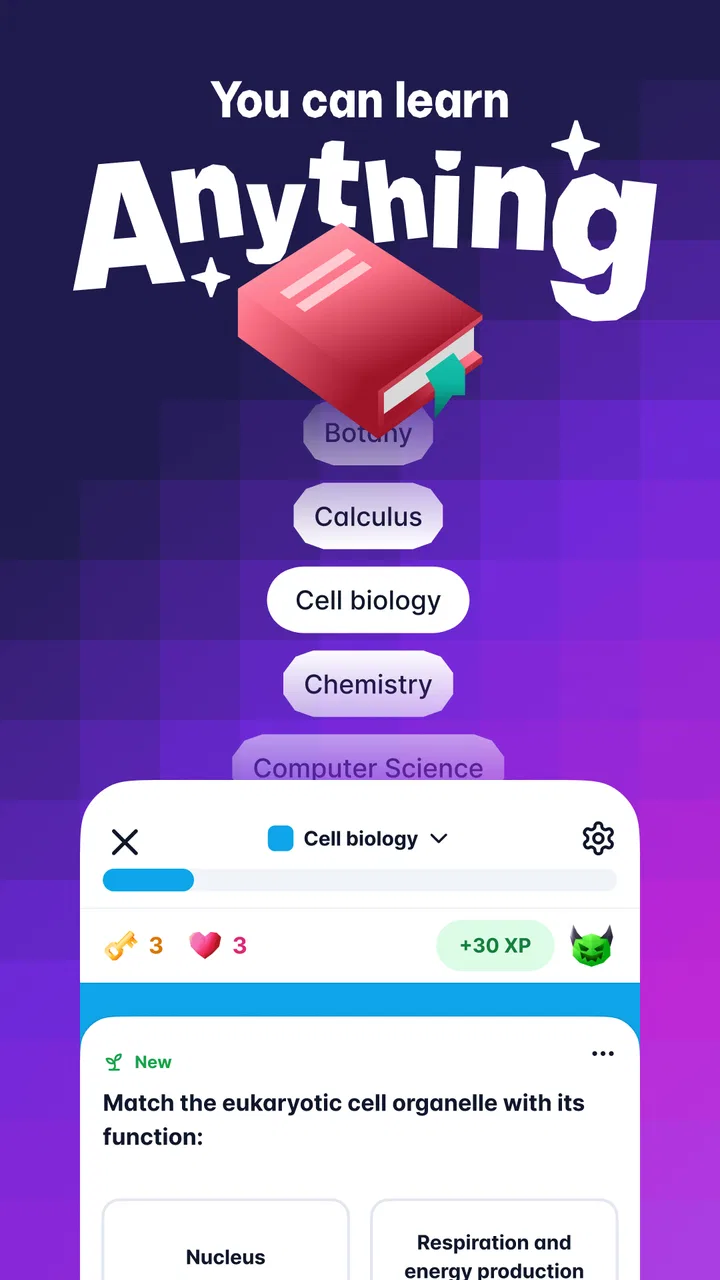
Gizmo: AI Flashcards and Tutor
- 4.8
- Rating
- 1.00M
- Installs
- Free
- Price

 Analysis by App-foxy
I tried Gizmo: AI Flashcards and Tutor as a study companion rather than treating it like another passive reading app, and that distinction matters. Its main appeal is the combination of flashcard creation and an AI tutor in one education app. Instead of waiting until I have time to build a perfect study system, I can turn a topic into something I can actively recall, review, and question. That makes it especially interesting for students, language learners, and anyone preparing for an exam who tends to collect notes without revisiting them.
Gizmo is free to install, with optional in-app purchases ranging from $4.99 to $155.22 per item. It is made by Save All, is suitable for Everyone, and runs on Android devices using version 8.0 or later. The current version is 3.2.44. Those details make it accessible to a broad audience, although the purchase range is worth keeping in mind before assuming every part of the experience will remain free.
How Gizmo feels in everyday study
The first thing I noticed is that the app is built around doing something with information, not merely displaying it. A flashcard is useful because it makes me retrieve an answer before seeing it, while the tutor side gives me a more conversational way to explore a difficult point. I found that pairing valuable: cards help create a repeatable routine, and the tutor is better suited to confusion, follow-up questions, and explanations.
You May Also Like

 Blood Strike: 2.5 Anniversary
Blood Strike’s Loadouts Turn Every Drop Into a Tactical Gamble
A close look at Blood Strike’s custom loadouts: how fast access to signature weapons reshapes its battle royale rhythm, rewards preparation, and narrows the gap between fights.

 Pandora - Music & Podcasts
Pandora’s Music Is Easy to Start, but Harder to Recover
Pandora’s strength is its low-effort path from a seed to a station. Its weak spot is how much confidence it asks you to place in connection, setup, and quiet recovery.

 8 Ball Pool
 Is Built on Rivalries, Rematches, and Routine
A close look at the rivalries, rematches, shared routines, and unanswered safety questions that turn a quick pool match into a persistent mobile community.

 Samsung Music
’s Quiet Strength Is Playing What You Already Own
Its reach comes less from spectacle than from dependable access to a personal library. That simplicity is both the app’s strongest retention engine and its ceiling.

 AccuWeather: Weather Radar
AccuWeather Review: A Quick, Clear Forecast for Everyday Decisions
For everyday plans, the best forecast is the one you can understand quickly. AccuWeather makes rain timing, radar, and local conditions easy to act on, with a few trade-offs.

 Hill Climb Racing
Why Hill Climb Racing Still Turns Crashes Into One More Run
A tiny car, a bumpy hill and one more upgrade: Hill Climb Racing keeps resurfacing because its simple chaos makes every near-miss feel personal.
More From Our News Desk



That combination also changes how I approach a large subject. With a conventional flashcard app, I usually need to prepare the cards myself or import a deck from somewhere else. That can be effective, but it creates a barrier before studying even begins. Gizmo’s AI flashcard maker is intended to reduce that preparation work, so I can spend more time identifying weak areas and less time formatting prompts and answers.
I would not describe it as a replacement for a textbook, teacher, or carefully written course material. The app is strongest as a layer placed on top of material I already need to learn. It helps me convert that material into active practice and gives me a place to ask for clarification. For subjects where exact wording, formulas, or official definitions matter, I would still compare important cards and explanations with the original source.
A realistic study routine
Imagine I have a biology test later in the week. Rather than rereading a long chapter every evening, I can use the material to create a focused set of cards, work through the questions, and note which concepts repeatedly cause trouble. When I encounter a confusing process, I can use the AI tutor to ask for a simpler explanation or a distinction between two terms. I would then return to the cards and see whether I can answer without help.
The useful part of that workflow is the movement between recognition and recall. Rereading can make a subject feel familiar without proving that I can reproduce it under pressure. Flashcards expose that gap. The tutor can then help me investigate the gap, but I still need to finish by answering independently. In my experience, that last step is where the app becomes a study tool rather than a shortcut.
For language learning, I would use it differently. I could make cards for vocabulary, definitions, and example meanings, then use the tutor for questions about usage or distinctions between similar words. I would be cautious about treating generated language explanations as the final authority, especially when nuance or regional usage matters. Still, the ability to move from a memorization prompt to a natural question is more flexible than a deck alone.
Where the AI approach helps and where it needs supervision
The AI element is most helpful when I already know what I am trying to learn but need a faster way to organize it. It can make a study session feel less administrative. Instead of spending the first part of the session deciding how to phrase every card, I can concentrate on checking whether the resulting questions are useful.
That checking step is not optional. Automatically generated flashcards may be too broad, too easy, oddly worded, or missing an important qualification. A card that asks for a single definition may hide the fact that a concept has exceptions. I recommend editing or deleting weak cards rather than accepting a large generated set simply because it looks productive.
My practical tip is to build smaller topic groups instead of one enormous collection. A compact set about one lecture, chapter, or skill is easier to review honestly. It also makes mistakes easier to spot. If a generated card combines several facts into one answer, I would split the idea mentally or rewrite the prompt so that it tests one clear point.
The tutor deserves similar caution. It is convenient for asking “why” or “what is the difference,” but convenience can encourage passive reading. I get more from it when I first attempt an answer, then use the tutor to challenge or correct my understanding. Asking it to explain a concept in simpler language is useful; asking it to do all the thinking defeats the purpose of active study.
What has changed for users over time
Gizmo was released on February 21, 2022, and its current version, 3.2.44, shows that the app has continued through multiple iterations rather than remaining at its launch state. I see that as a positive sign for an app built around AI-assisted learning, because this kind of product depends on ongoing refinement. The underlying expectations around automated explanations and card generation change quickly, so continued version development matters.
At the same time, a version number by itself does not tell me that every earlier frustration has disappeared. Existing users should think of the current release as the version to evaluate now, not as a promise that every workflow will suit every learner. If I already have a carefully maintained deck system, I would test how comfortably my existing habits fit into Gizmo before moving everything over.
The app’s strong public reception is notable: it has a 4.8 average from around 122 thousand ratings and has passed one million installs. That suggests the central idea has connected with many learners, but popularity is not the same as a perfect fit. A person who wants complete manual control may still prefer a traditional flashcard tool, while someone who dislikes AI-generated study material may find Gizmo’s main advantage unimportant.
For someone already using the app, the biggest practical effect of ongoing development is likely the need to revisit old study habits. I would periodically inspect older decks, remove duplicate cards, and check whether prompts still test what I actually need. Newer capabilities are most useful when they improve a disciplined routine; they do not automatically repair an overloaded or poorly organized collection.
How it compares with ordinary alternatives
Compared with handwritten cards, Gizmo is faster to scale and easier to use when I want to study across several subjects. Paper cards have a satisfying simplicity and no need for an AI tutor, but they require more preparation and provide less help when I get stuck. I would choose paper for a small, personal set of facts and Gizmo for material that changes frequently or needs more explanation.
Compared with a basic flashcard app, Gizmo’s distinction is the attempt to combine creation, review, and tutoring. A basic app may be better if I want a clean, predictable interface where every card is written by me. Gizmo is more appealing when the preparation stage is the part I keep avoiding. The trade-off is that automation introduces a review burden: I save time creating cards, but I must spend some of that time checking their quality.
Compared with watching educational videos, Gizmo encourages me to prove what I remember. Videos can offer richer demonstrations and context, especially for practical or visual subjects, but they are easy to consume without retention. I would use a video or textbook for the initial lesson and Gizmo for retrieval afterward. That combination is more sensible than expecting flashcards to teach every topic from zero.
Compared with a human tutor, the app is available for quick questions and repeated practice, but it cannot replace a teacher who knows my course, notices my misunderstandings, and adapts to my progress in person. Gizmo is a convenient supplement, particularly between classes. It is not the right choice if I need guaranteed expert judgment for high-stakes professional training.
Small workflow decisions that make a big difference
One useful habit is to separate “recognition cards” from “explanation cards.” A recognition card checks whether I know a term or fact. An explanation card asks me to describe a process, compare ideas, or justify an answer. If every card only asks for a short definition, I can develop the illusion of mastery while struggling with longer exam questions. I would deliberately include both styles when the subject requires reasoning.
Another tip is to use the tutor after a failed recall attempt, not before it. I first answer from memory, mark the uncertainty, and then ask for help. This preserves the diagnostic value of the flashcard. If I read the explanation first, the next review can feel easier without showing whether I could have produced the answer alone.
I would also keep generated material close to its source context. When a subject has similar terms, dates, stages, or exceptions, isolated cards can become ambiguous. Adding a short context cue to the question can make a major difference. This is especially important when reviewing several chapters together, because a vague prompt may have more than one reasonable answer.
Finally, I would avoid measuring a session only by the number of cards completed. A smaller set of corrected, well-understood cards is more valuable than racing through a large set with guesses. The app makes it easy to keep moving, but my best results come from slowing down when a card exposes a real gap.
Who should use it and who should skip it
I think Gizmo is a strong match for learners who want help turning notes or study material into active practice. It is particularly suitable for people who know that rereading is not enough but struggle to build flashcards from scratch. Students preparing for tests, independent learners building vocabulary, and busy adults reviewing professional concepts can all benefit from the short, repeatable format.
It is also a good option for someone who wants one app to cover both memorization and follow-up questions. The AI tutor gives the experience more flexibility than a fixed deck, while the cards keep the interaction grounded in recall. That balance is the reason I would recommend trying it before buying a separate flashcard system and a separate question-and-answer tool.
I would skip it, or at least treat it as secondary, if I require every card to be manually authored and every explanation to come from a verified instructor. I would also hesitate to rely on it alone for subjects where a small wording error could have serious consequences. Learners who dislike reviewing generated content may find the automation less helpful than it first appears.
The age rating of Everyone makes it broadly approachable, but suitability for a young learner still depends on supervision and the subject being studied. An adult or teacher should help check important material, particularly when the app is being used for formal coursework. Accessibility does not remove the need for judgment.
Costs, device support, and everyday friction
The free entry point makes it easy to test whether the study method fits me before committing money. However, the in-app purchase range is wide, from $4.99 to $155.22 per item, so I would inspect the purchase screen carefully and avoid assuming that all advanced use is included at no cost. The right decision depends on how frequently I study and whether the extra capabilities save enough preparation time to justify spending.
Android support begins with version 8.0, which covers many devices but still excludes older phones and tablets. On a supported device, I would make sure the app is updated before judging its current behavior, since the active release is version 3.2.44. I would also keep a backup of especially important source notes outside the app. That is good study hygiene whenever a workflow depends on generated collections rather than a single handwritten notebook.
The main friction is not learning how to tap through cards; it is maintaining quality. AI can make the first draft of a deck quick, but the learner remains responsible for spotting ambiguity, missing context, and incorrect emphasis. People looking for a completely automatic teacher may be disappointed. People willing to edit, question, and practice will get more value.
My final view of the current release
After using Gizmo as a real study aid, I see it as a practical bridge between conventional flashcards and conversational AI. Its most convincing strength is not that it promises to make learning effortless. It is that it lowers the effort needed to start active recall while giving me somewhere to investigate the parts I do not understand.
The app’s development history and current version suggest an evolving product, so I would watch how consistently generated cards remain useful, how well existing users can organize long-term collections, and whether the tutor continues to support learning without encouraging passive dependence. Those are more important questions than simply adding more automation.
My recommendation is straightforward: try the free experience with one focused subject, inspect every generated card, and use the tutor only after attempting the question yourself. If that routine helps you study more consistently, Gizmo can become a valuable education companion. If you already have a precise manual system or need authoritative instruction, a traditional flashcard app, textbook, or human teacher may remain the better foundation.
For me, the app earns its place because it connects preparation with practice. I would not trust it blindly, and I would not use it as my only source for difficult material. Used with those limits in mind, Gizmo: AI Flashcards and Tutor offers a flexible way to turn scattered study time into deliberate recall, which is a meaningful improvement over simply reading the same notes again.
FAQs for Gizmo: AI Flashcards and Tutor
01What is Gizmo: AI Flashcards and Tutor, and how does it work?
Gizmo: AI Flashcards and Tutor is a study app designed to help you learn through AI-generated flashcards, quizzes, and spaced-repetition reviews. You can create study material from notes, documents, questions, or other learning resources, then practice it in short sessions. The app adapts revision timing around your performance, making it useful for memorizing vocabulary, exam topics, definitions, and general academic content.
02Can Gizmo create flashcards automatically from my notes or documents?
One of Gizmo’s most useful features is its ability to turn learning material into flashcards with the help of AI. Depending on the source and supported import options available in your version, you may be able to use notes, pasted text, files, or other study content to generate cards and quizzes. You should still review the results carefully, because AI-created cards can occasionally omit context, misunderstand a topic, or contain inaccurate information.
03Is Gizmo suitable for school, university, language learning, and exam preparation?
Gizmo can be useful for many types of learning because its flashcard and quiz format works well with facts, terminology, formulas, concepts, and language vocabulary. It may help students preparing for school tests, university courses, professional certifications, or language exams. However, it should complement textbooks, lessons, and practice exercises rather than replace them, especially for subjects requiring calculations, writing, or deeper problem-solving.
04Does Gizmo: AI Flashcards and Tutor require an internet connection or account?
The app may require an account for saving progress, synchronizing study materials, and accessing AI-powered features. An internet connection is generally expected when generating content, using the AI tutor, or syncing information between devices, while some previously downloaded or cached study sessions may work with limited connectivity. Exact offline access, login requirements, and synchronization options can vary according to the current app version and platform.
05Is Gizmo free to download, and are there subscriptions or in-app purchases?
Gizmo may be available to download without an upfront charge, but some advanced functions can be limited by a subscription, usage allowance, or in-app purchase. Premium access may cover features such as expanded AI generation, additional study tools, or higher limits. Before starting a trial or entering payment details, check the current pricing, renewal terms, and cancellation instructions shown in the App Store or Google Play listing.
Pros
- Personalized flashcards adapt to your learning pace and progress.
- AI tutor offers quick explanations when a concept feels unclear.
- Supports active recall
- helping improve long-term memory.
- Useful for exam preparation
- language learning
- and general study.
- Clean interface makes reviewing cards easy during short study sessions.
Cons
- AI-generated cards may occasionally contain errors or missing context.
- Advanced features may require a subscription or in-app purchase.
- Heavy reliance on AI can reduce the need for deeper independent study.
- Creating high-quality decks can take time for specialized subjects.
- Some learners may prefer more detailed progress and performance statistics.

Gizmo: AI Flashcards and Tutor
Gallery